Configuring Pumpoff
The Pump-off Configuration dialog box enables you to input numerical values for the POC, MAL, Peak Load, and Minimum Load setpoints. It also enables you to configure successive strokes in each condition that will cause the pump to shut off.
To Configure Pump Off
- In the card plot area, locate the POC or MAL point on the relevant surface card and drag it to the load and position coordinates where pump-off control or malfunction are to occur.
- Open the Pump-Off Configuration dialog box in one of two ways:
- Double-click the POC or MAL point on your surface card.
- Right-click the relevant dynagraph card, select Edit, then click Edit Pumpoff Config.
- In the Pump-Off Configuration dialog box that appears, make settings edits as you require.
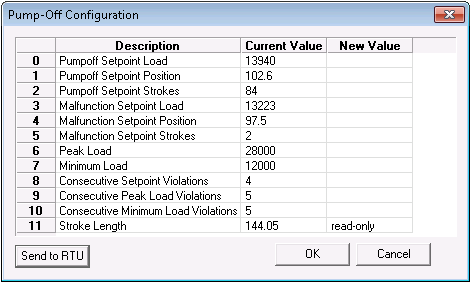
- Optional: Click OK to save settings changes and run them on the relevant card. Clicking OK does not send the new settings to the remote device. If you want to send these settings to the RTU at a later time, click OK now, then right-click the relevant dynagraph card, click Send to Device, then click Pumpoff Config.
- Optional: Click Send to RTU to save settings changes and send them to the RTU, where they will overwrite existing settings.

